Recording a cash sale
Ring up a straightforward cash sale at the till.
This is the most common sale you'll record — a customer pays in full, right now.
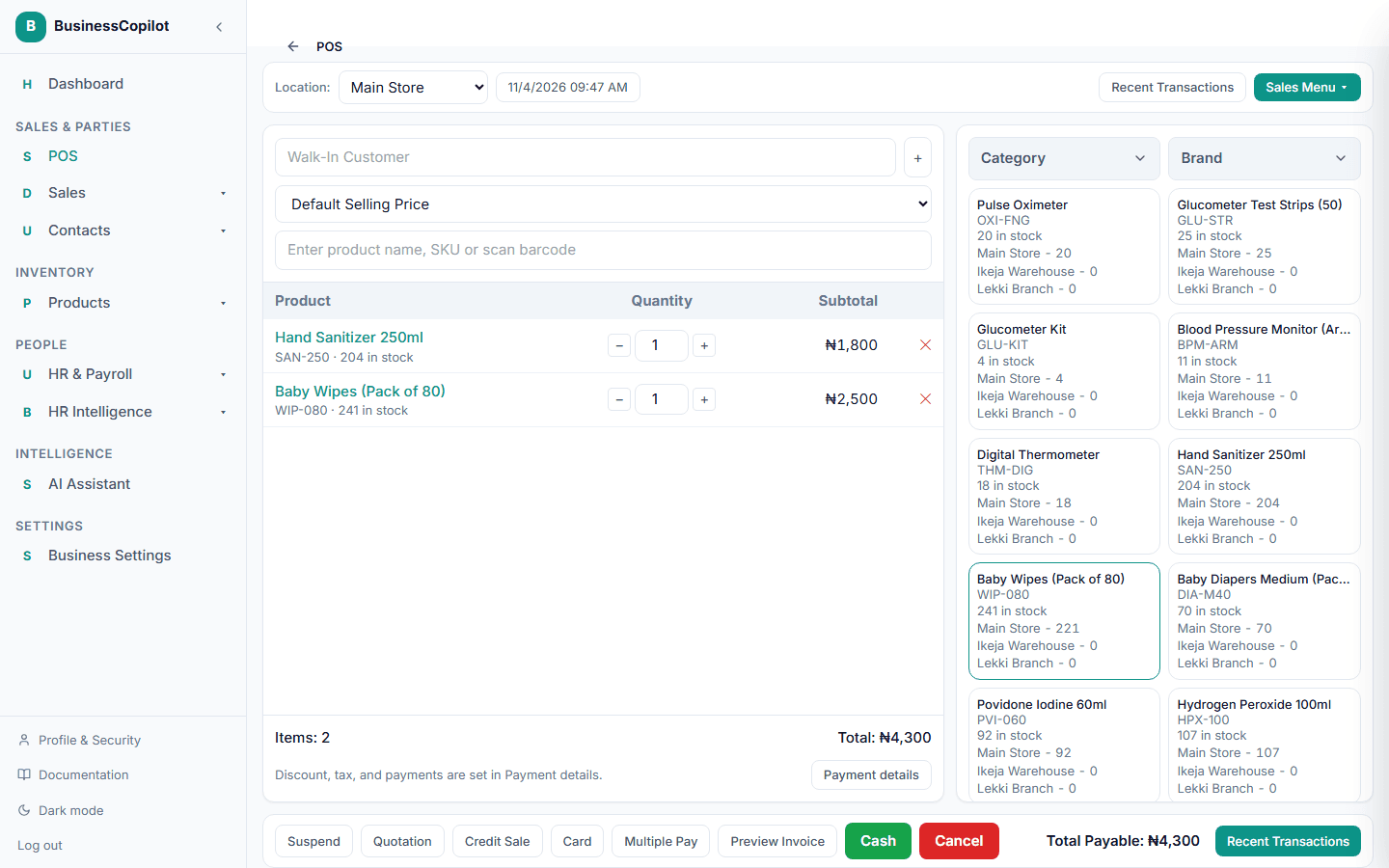
- Go to Sales POS.
- Search for a product by name, SKU, or barcode, or select it from the product browser on the right. It's added to the cart.
- Repeat for every item the customer is buying. Adjust quantity with the +/− buttons on any line.
- If the customer is a regular you have on file, search for them in the customer field instead of leaving it as "Walk-In Customer."
- Select Cash in the bottom action bar.
The sale completes immediately and your stock updates. A Sale completed popup then offers Print Receipt or Skip — see all the ways to print a receipt for what else is available. Select Preview Invoice before finishing if you want to check the receipt first.
Related
- Understanding the POS/checkout screen
- Applying a discount to a sale
- Understanding stock levels across branches — every completed sale reduces stock at the branch you sold from
- Viewing your sales history and receipts
- Receipt printers and silent printing