Confidential notes
Restrict sensitive notes to the people who should read them, give a role confidential access, and see what everyone else sees.
Some notes are more sensitive than others — a counselling session, a test result, a safeguarding concern. You can mark any note confidential. A confidential note can only be read, searched, edited or downloaded by people whose role includes confidential access. Everyone else sees only a locked entry.
How it works
Confidential access is its own permission line, separate from ordinary notes access, so giving a role Clinical Notes access never gives it confidential access by accident.
To open a confidential note, a person needs both:
- View on the Clinical Notes line, and
- View on the Confidential Clinical Notes line.
The Owner has confidential access automatically. Everyone else gets it only if you give it to their role.
Marking a note confidential
Anyone who can write or edit notes can tick Confidential note — when writing the note, or later by editing it.
Important: once a note is confidential, only people with confidential access can open, edit or delete it — including the person who flagged it. If you tick the box without having confidential access yourself, the form warns you: "once saved you won't be able to open or edit this note again." After saving, you'll see a message rather than the note.
Only someone with confidential access can remove the flag.
What people without access see
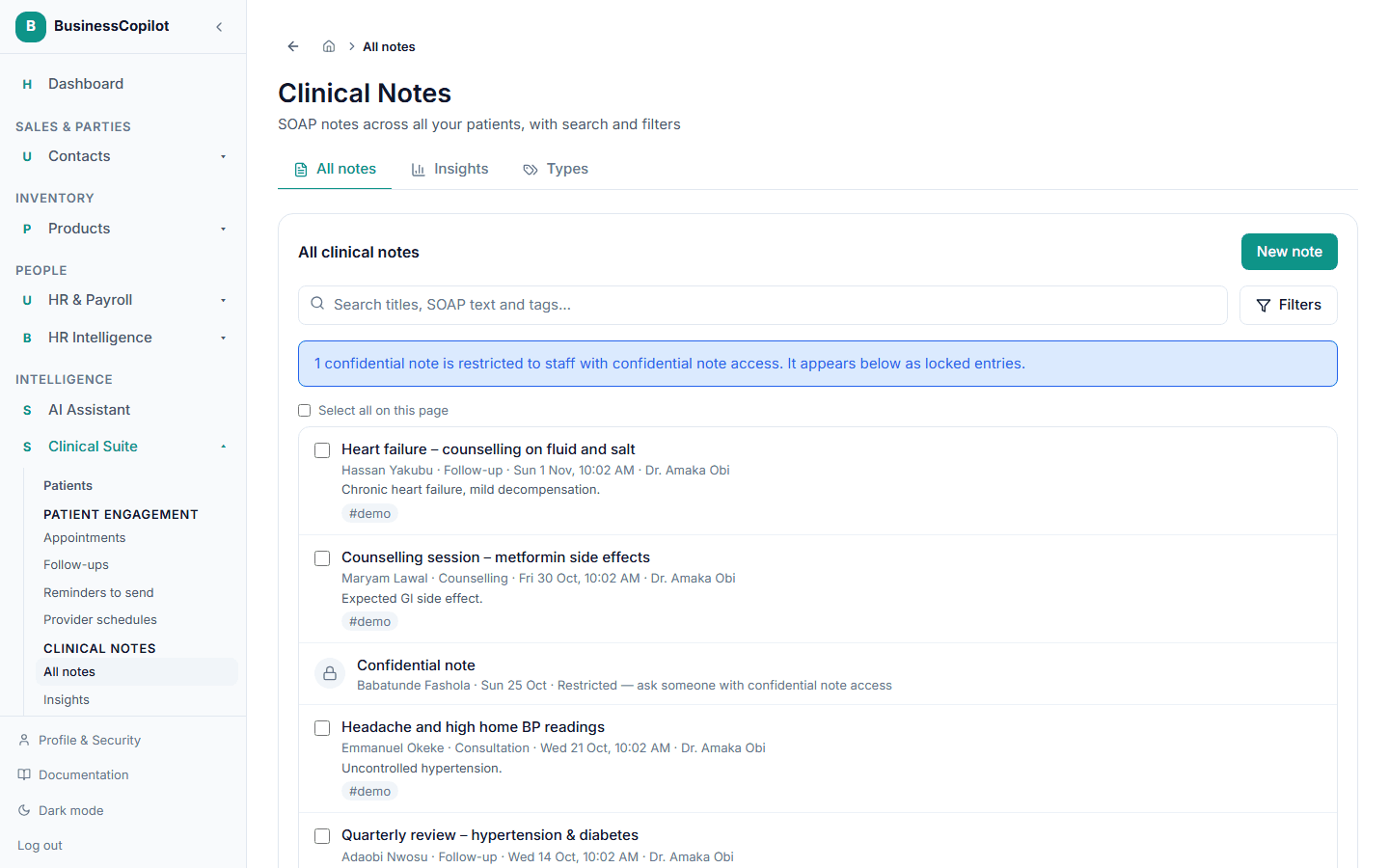
They see a locked entry in the list:
- a padlock,
- the words Confidential note,
- the note's date (and the patient's name on the all-notes list).
That's all. They don't see who wrote it, its type, its title, its priority, its tags, how many files it has, or a single word of what's in it.
- Selecting a locked entry shows "This note is confidential" and who to ask.
- It never appears in search results. Searching for a word that appears only in a confidential note finds nothing, so nobody can work out what a hidden note says.
- It leaves the list whenever they filter by type, priority, tag or author, for the same reason.
- Its files can't be downloaded, and it is skipped by bulk changes.
- Insights count it (as "Confidential") but never break it down by type, priority, tag or author — see Notes Insights.
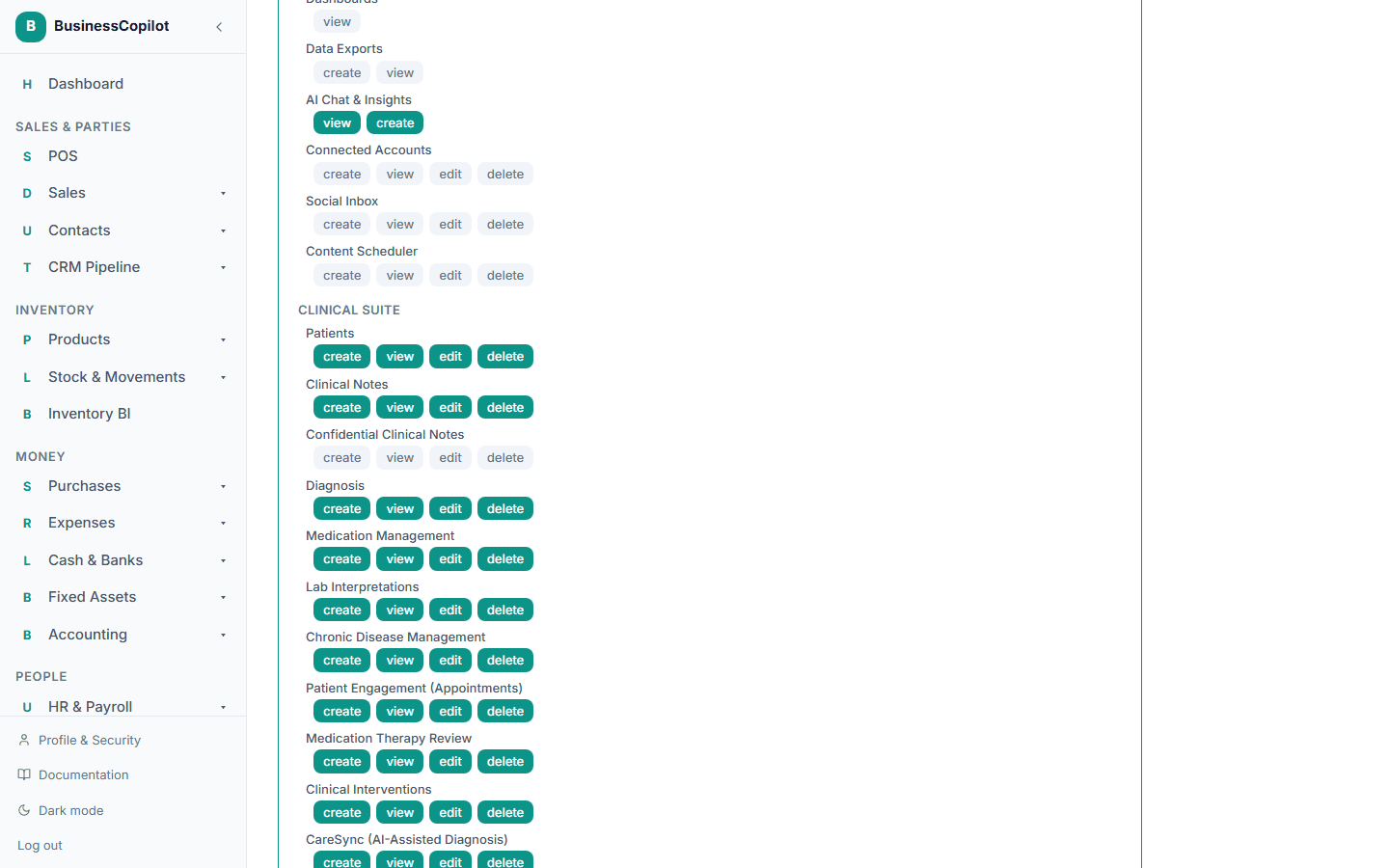
Giving a role confidential access (Owner)
- Go to Roles & Permissions and open the role.
- Find Clinical Suite → Confidential Clinical Notes.
- Tick the actions you want:
| Action | Lets the role |
|---|---|
| View | Read confidential notes, find them in search, and download their files. |
| Edit | Change a confidential note, add or remove its files, and remove the confidential flag. Needs View as well. |
| Delete | Delete a confidential note. Needs View as well. |
| Create | Nothing extra today — anyone who can write notes can already flag one confidential. |
- Save.
The role also needs the matching action on the ordinary Clinical Notes line. Edit or Delete on the confidential line without View does nothing.
A common setup is to give confidential access only to your pharmacist-in-charge role and keep it away from front-desk roles. Your eight starting roles don't include one called "pharmacist", so decide which role suits your business.
What is recorded
BusinessCopilot records confidential-note activity in the workspace Activity feed (people whose role includes audit access can open it, for example from Team → View Activity on a person):
- every time someone opens a confidential note,
- every file download from one,
- every attempt to open one without access (shown as a warning),
- every time a note is marked or unmarked confidential,
- ordinary edits and deletes, as for any note.
The Activity feed never contains the note's text, its title, or its file names — only that something happened, who did it, and when. Reading an ordinary note is not recorded.
Good to know
- The Recycle Bin shows only a date. A deleted note appears there as "Clinical note - Sep 21, 2026", never with its title, so a confidential title isn't exposed to someone who can browse the Recycle Bin.
- A change to a role applies straight away where it matters. The moment you remove confidential access, that person's requests for confidential notes are refused. Their own screen can take a few minutes to catch up and stop offering buttons they can no longer use.
- Confidential means restricted inside your business. It isn't a substitute for your own privacy and record-keeping obligations.