Patient reminders
Which messages patients get, by SMS and email, when they go out, and when they're held back for your team to send.
BusinessCopilot reminds patients about their appointments so fewer are missed. You don't need to do anything — reminders are set up the moment an appointment is booked.
Which messages are sent
| Message | When it goes | Example wording |
|---|---|---|
| Booking confirmation | Straight after you book. | "Hi Ngozi, your consultation with Ade Bello is booked for Tue 22 Sep at 10:00 AM." |
| 24-hour reminder | 24 hours before the appointment. | "…this is a reminder of your consultation with… on Tue 22 Sep at 10:00 AM." |
| 2-hour reminder | 2 hours before the appointment. | Same wording as the 24-hour reminder. |
| Reschedule notice | Straight after you reschedule. | "…your consultation with… has been moved to…" |
| Cancellation notice | Straight after you cancel. | "…has been cancelled. Please contact us to rebook." |
Every text starts with your business name, like "GreenPharm: Hi Ngozi, …".
If an appointment is booked so close to its time that a reminder time has already passed, that reminder is skipped — nobody gets a "24 hours before" reminder for something starting in an hour.
When you reschedule, cancel, complete, mark a no-show or delete an appointment, reminders that haven't gone out yet are withdrawn automatically.
SMS and email
Each patient decides which they get, on their record under Reminder Preferences:
- SMS reminders — sent to their phone number.
- Email reminders — sent to their email address (they need one on file).
Both are ticked by default. A patient with neither ticked receives nothing; the appointment's Patient messages section will say "No reminders were queued for this appointment (the patient may have opted out of both email and SMS)."
Emails also include a link so the patient can confirm or cancel — see The confirmation link.
When a text can't go out on its own
Text messages are only sent automatically when everything is in place. When it isn't, the message is not lost — it moves to your Reminders to send list so a person can send it by hand. The reason is shown on each one:
| Reason shown | What it means |
|---|---|
| Automatic SMS is switched off | Automatic texting is turned off for your account right now. Patients are still emailed. |
| Your SMS sender ID isn't approved yet | You haven't requested a sender ID, or it's still waiting for approval. |
| The patient has no phone number | Add one on their record. |
| The patient's phone number isn't valid | Check the number on their record. |
| Too late to send before the appointment (no SMS between 8 PM and 8 AM) | See "Quiet hours" below. |
| The SMS could not be delivered | The network refused it (for example the number blocks marketing texts). |
Emails are unaffected by any of these.
Quiet hours
No automatic text is sent between 8 PM and 8 AM Nigerian time. A text that comes due overnight waits and goes out at 8 AM. If 8 AM would be too late — the appointment would already have started — it goes to your Reminders to send list instead, so someone can decide whether to call.
Your SMS sender ID
The sender ID is the name patients see as the sender of your texts — for example "GreenPharm" instead of a phone number. It's 3 to 11 letters or numbers. It has to be approved before texts can go out automatically.
To request one (you need the Edit permission):
- Go to Clinical Suite → Reminders to send.
- Find the SMS sender ID card.
- Type your Sender ID (for example GreenPharm) and your Company name (for example GreenPharm Ltd).
- Select Request sender ID.
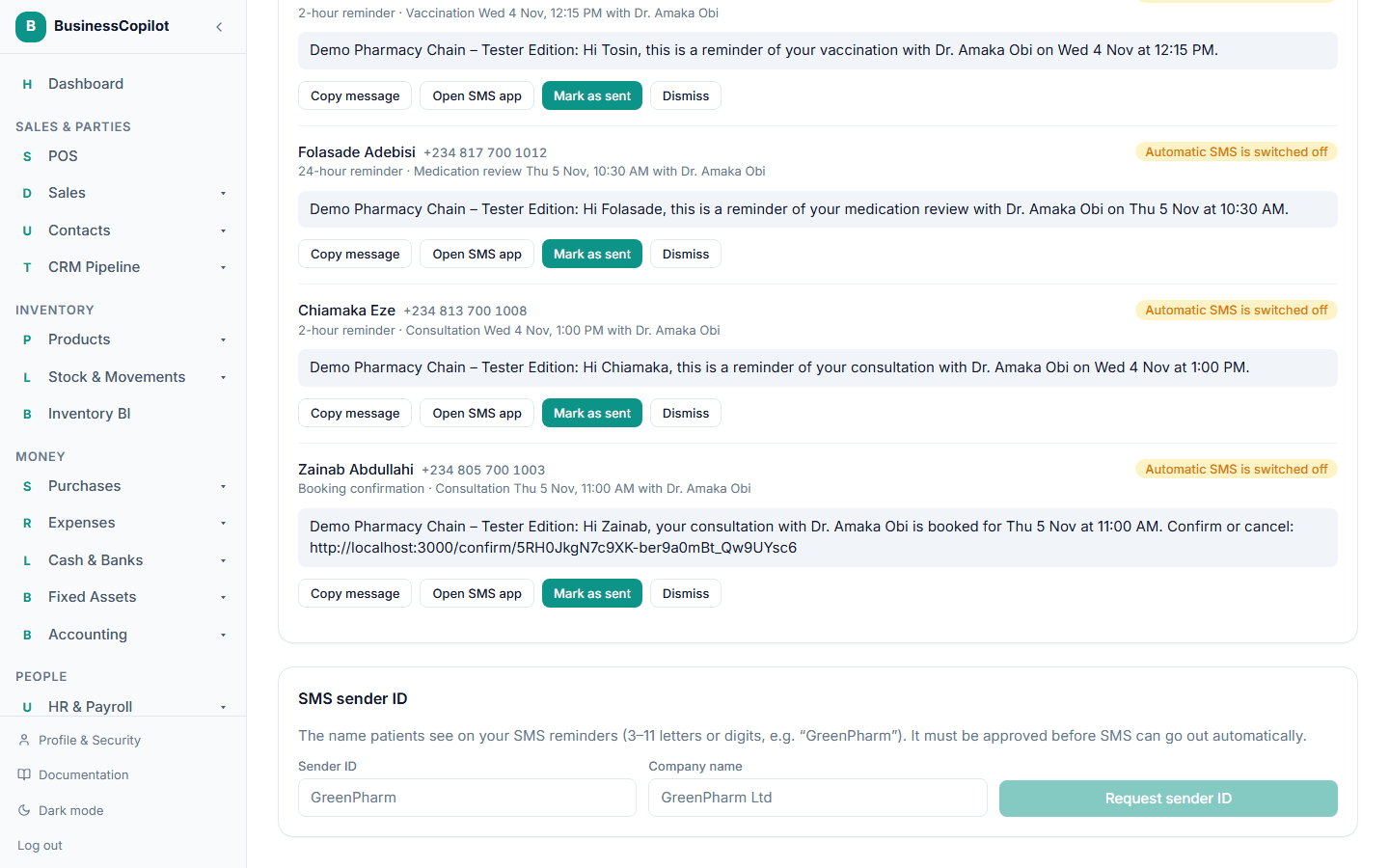
You'll see "Requested. Our SMS provider will contact you to approve it — this page updates when they do." The card then shows a pill:
- Waiting for approval — the request is in.
- Approved — texts now go out automatically.
- Blocked — it was refused. Select Request a new one and try a different name.
Someone without Edit sees "Ask someone with edit access to request a sender ID."
Once a sender ID is Approved it can't be replaced by requesting another — the request form is hidden, and BusinessCopilot refuses the request if one is sent anyway, so texts never stop by accident. If you really need a different name, contact support.
Until the sender ID is approved, everything still works — patients are emailed, and each text waits in Reminders to send.