Understanding VAT and WHT posting
How VAT and Withholding Tax actually post against your accounts, and where to find your filing figures.
Setting up your VAT rate covers creating a tax code in plain terms. This page covers what that tax code actually does once it's in use, plus Withholding Tax (WHT).
This is a working configuration, not tax advice. Independently verify every rate, category, and treatment against current FIRS requirements with a qualified Nigerian tax professional before relying on any figure here for filing.
Tax codes, in full
Go to Accounting → Tax Codes. Each code has:
- A type — VAT Standard, VAT Zero-Rated, VAT Exempt, or WHT.
- A rate, as a percentage.
- An Applicable Account — which ledger account this tax posts against (for VAT, typically a VAT Payable or Input VAT Recoverable account; for WHT, a WHT Payable account).
- Recoverable, checked only for Input VAT you can reclaim.
- A Category, for WHT codes only (e.g. "rent," "professional services") — this drives the by-category breakdown on the WHT Report.
How it posts
When a sale or a supplier bill carries a tax code, the entry it posts includes an extra line for that tax, split out from the underlying revenue or expense — Output VAT on what you sell, Input VAT (and WHT, where applicable) on what you buy.
Your filing figures
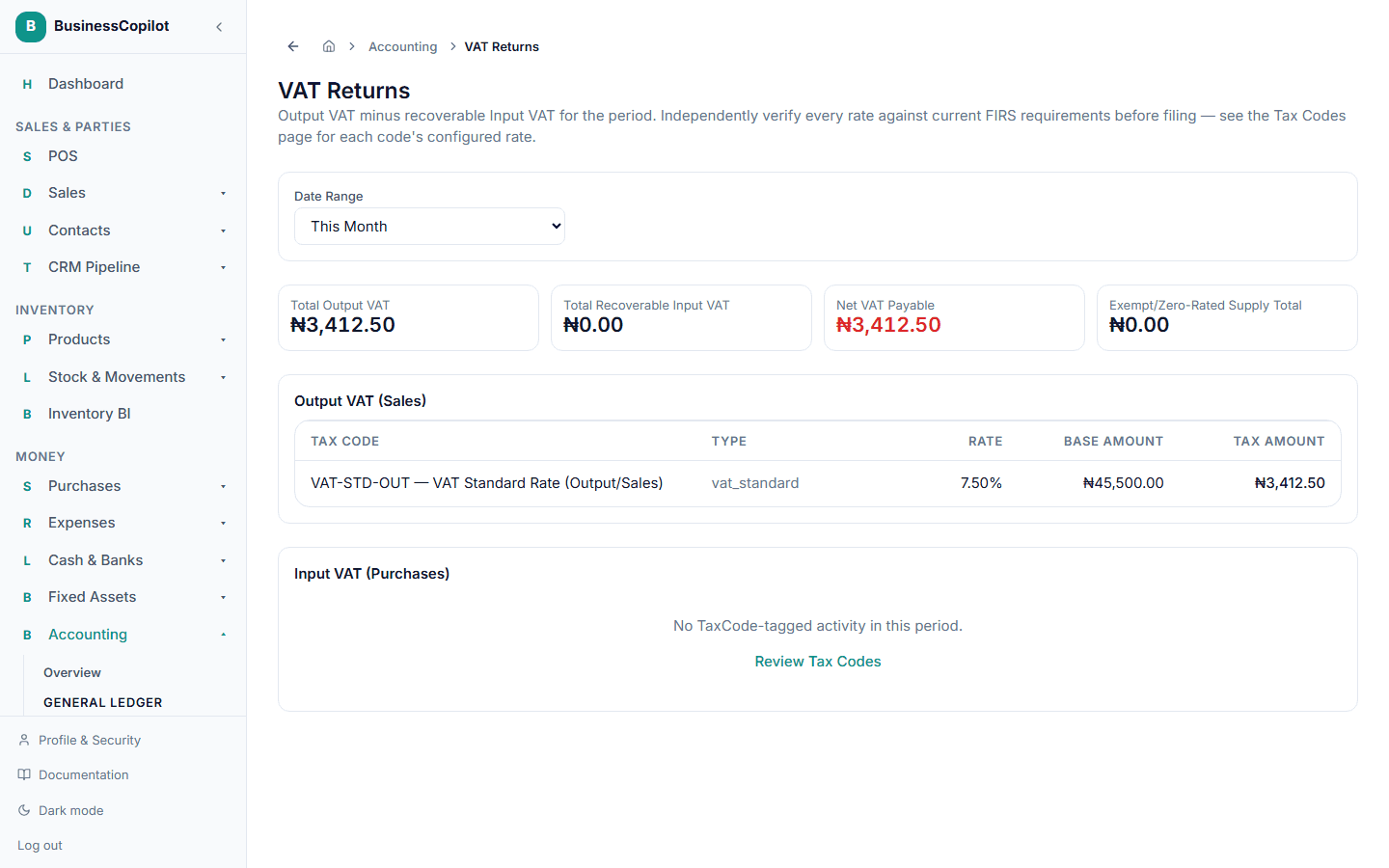
- Accounting → VAT Returns — Output VAT minus recoverable Input VAT for a period, broken down by tax code and rate, giving you your Net VAT Payable (or Refundable).
- Accounting → WHT Report — WHT withheld from supplier payments, broken down by supplier and by category, plus how much is still sitting unremitted versus already paid to FIRS. Remitting WHT you've withheld is an ordinary manual journal entry — debit WHT Payable, credit the bank account you paid from.
Confirming it's accurate
Accounting → Tax Reconciliation cross-checks your tax-code-tagged activity for a period against the actual Output VAT, Input VAT, and WHT Payable ledger balances — select a date range and Run Reconciliation. If anything doesn't tie out, you'll see an Accounting Integrity Exception rather than a silently wrong filing figure; see Reconciliation & Accounting Integrity Exceptions for what that means and what to do about it.