No-show risk
The Low, Medium or High label on upcoming appointments — what it's based on, where you see it, and what it does and doesn't do.
A no-show is a patient who doesn't turn up. BusinessCopilot gives each upcoming appointment a no-show risk label — Low, Medium or High — so your team can spend their phone calls where they help most.
Important: it's a suggestion, not a verdict
- The label is worked out from simple, visible rules — not a prediction of what a patient will do.
- It shows its reasons, so you can judge for yourself.
- Nothing happens automatically because of it. No message is sent, no appointment is cancelled, and no one is blocked from booking.
How the label is worked out
Points are added for each reason that applies:
| Reason | Points |
|---|---|
| The patient missed one appointment in the last 12 months | 2 |
| The patient missed two or more in the last 12 months | 3 |
| Still unconfirmed and starting within 48 hours | 1 |
| It's the patient's first visit (no completed or missed visits before) | 1 |
| Booked more than 14 days ahead (not counted for recurring visits, which are all booked together) | 1 |
Then:
| Total points | Label |
|---|---|
| 0–1 | Low |
| 2–3 | Medium |
| 4 or more | High |
A patient can only be High if they have missed a visit before. A new patient with no history can reach Medium at the very most, however many of the other reasons apply. So a first-time patient is never labelled High just because they're new.
The label only applies to appointments that are upcoming and still open (Scheduled or Confirmed). Past, cancelled and completed appointments don't have one.
Examples
- Ngozi missed one visit last March; her next appointment is next week and unconfirmed. Missed one (2) → Medium.
- Chidi missed two visits, and his appointment is tomorrow and unconfirmed. Missed two (3) + unconfirmed within 48 hours (1) = 4 → High.
- Amina is new, and booked three weeks ahead. First visit (1) + booked far ahead (1) = 2 → Medium.
- Tunde has never missed and his appointment is confirmed → Low.
Where you see it
- The calendar. A small dot ● before the patient's name on a Day or Week block — red for High, amber for Medium. Low has no dot, to keep the calendar quiet. Hover to read the reasons. In the Agenda, a Medium no-show risk or High no-show risk label sits next to the status.
- A patient's Appointments tab. The same label next to Medium and High appointments.
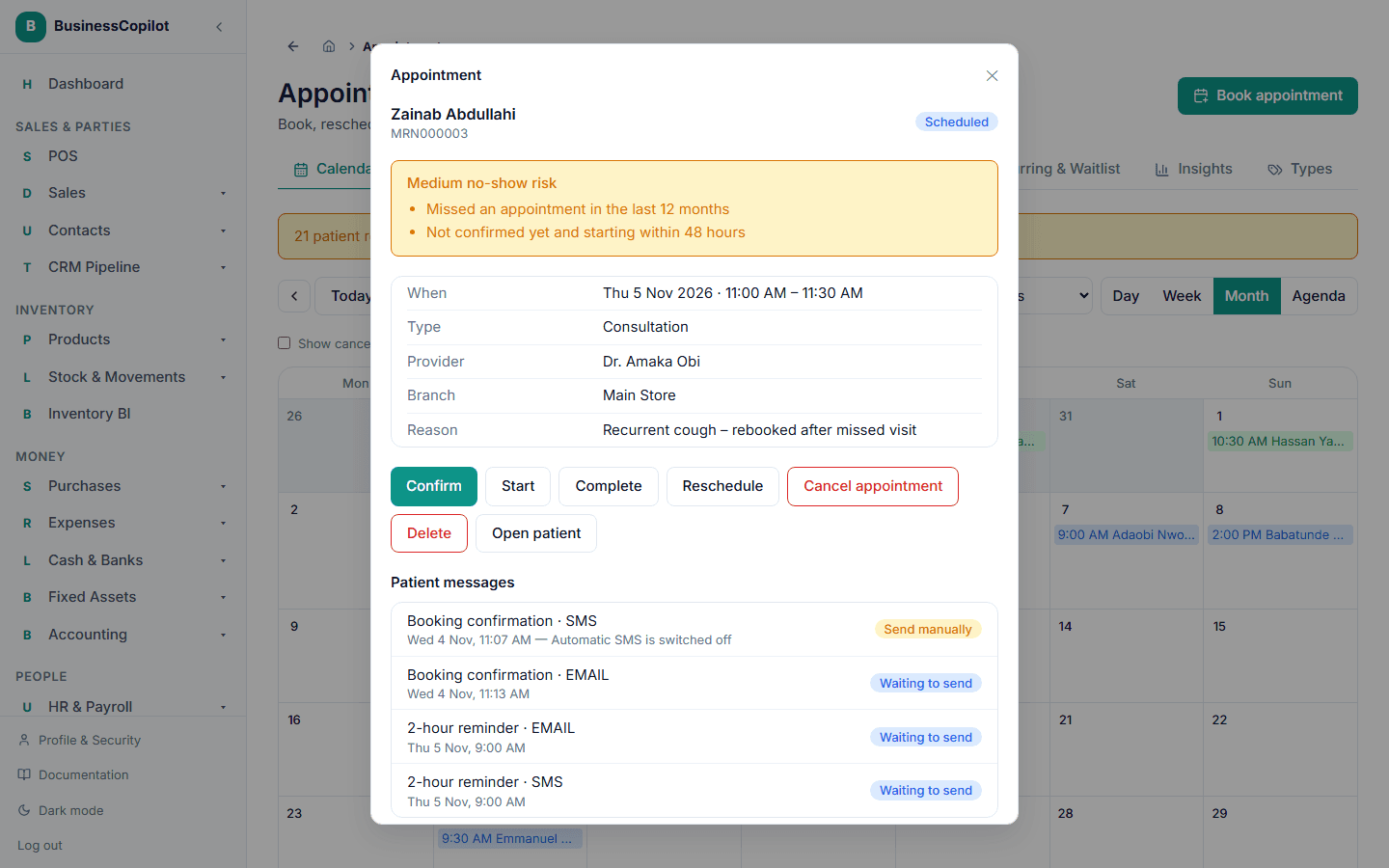
- The appointment itself. A panel shows the label and every reason, with every level shown, including Low — "Nothing in this patient's history points to a missed visit." For High and unconfirmed appointments it adds: "Consider calling the patient to confirm. This is a suggestion — nothing is sent automatically."
- Insights → Needs a call. The High-risk, unconfirmed appointments in the next 3 days. See Insights.
What to do about a High label
- Open Insights → Needs a call each morning.
- Phone the patient, or send a message.
- If they're coming, select Confirm on the appointment — the label drops the "unconfirmed" point.
- If they aren't, cancel it so the slot can go to someone else — see Managing an appointment and The waitlist.
You can also use it while booking: a ◆ on a slot means the booking already there is High risk and unconfirmed — see Suggested times and overbooking hints.
Good to know
- The label uses only appointment history at branches you're allowed to see.
- Marking a patient as a no-show is what feeds it — so mark them promptly and honestly.
- The thresholds are starting values. They may be adjusted as real data builds up.
Related
Insights
See how your appointments are really going — missed and cancelled visits, how busy each provider is, your busiest times, and who to call.
Suggested times and overbooking hints
How the booking form picks its suggested times, what the ◆ mark means, and why neither ever stops you booking what you want.